








Professional ICC Colour Profile service
|
Beginners to Digital photography and printing are often a little confused why a seperate ICC profile is required with 3rd party inks. The common misconception is that it covers up some inadequacy, which is of course not true.
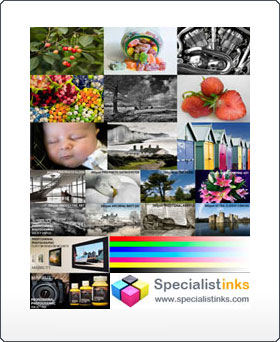
A printer requires ICC information no matter which inkset is used. This also applies to OEM inks, but the printer manufacturer is able to build the profile into the printer driver, so it appears that no profile is required when in fact one is. Third party inks have a slightly different colour space, therefore a different profile is required. Our profiling service will allow your prints to be of professional standard and ideal for portrait and wedding albums. A professional printer profile is created from an A4 print of the image above, this image is made up of nearly 1,000 colour patches. You print this image out and send it back to Specialist Inks using your basic print settings combined with your choice of Marrutt Paper. We then process this print, and e-mail you a finished printer profile. This profile allows you to print at a professional standard with your Marrutt Professional Photographic Paper.
Step 1: When you order your inkset notify us that your require A FREE PROFILE
Step 2: We send you the above A4 image through email. Step 3: Print out the supplied TC9.18 ISIS A4 target print on your favoured Marrutt inkjet paper according to the instructions supplied. Step 4 : Allow the print to dry thoroughly, then post this off in a stiff-backed envelope to address supplied. Step 5: Allow 3 working days for your print to be processed, and sent back to your e-mail address. Step 6: Print out our Master Calibration Image using your new printer profile, to test your printer accuracy. Step 7: Once your printer accuracy has been confirmed, you may now adjust your computer monitor to agree with your output print. Step 8: So long as you buy further stocks of Marrutt Ink or Lyson ink from us, you qualify for further regular 6 monthly colour check-ups for free. Most Helpful Customer Reviews I am now producing some stunning colour prints thanks to your free ICC profiles. Thanks again! Cannot believe how striking my photos are now! They look better than when I was using Epson Ink. Your Ink/Profiles are working a treat! Thanks for the profile for my Epson R3000 with Marrutt Pro Ink! The prints are looking great, Thank you again!
|

 UK & Europe

